

Simply TBR! FAQs

Got questions? You’re in the right place.
Simply TBR helps you keep track of your books so you can jump into reading quicker.
If a question you have isn't here please comment below or reach out through mail@simplykyra.com.
App Specific
App Store Page
 SimplyKyra LLC
App Website
 Kyra
Kyra
Email Updates
Supported Apple Devices
Simply TBR works on iPhone, iPad, and Mac (coming soon) working beautifully across all with iCloud sync keeping everything in harmony.
If you'd like to see more platform-specific features let me know at mail@simplykyra.com or in the comments below!
App Versions (Change Log)
 Kyra
Kyra
Legalities
I've posted both a privacy policy and a terms of use agreement for this app.
Need Help?
If you encounter an error that can't be fixed here feel free to reach out! You can leave a comment here or email me at mail@simplykyra.com and we’ll troubleshoot it together.
General
What belongs in my stack?
Simply TBR is for books you can actually read now or soon: books you own or have access to. It's intentionally not a wishlist... if a book is just "someday, maybe," it doesn't belong in the stack. That's what keeps the pile honest and tame-able.
Is this a reading tracker?
No, and that's on purpose. Simply TBR manages your backlog. When you finish a book it goes through the Exit Ceremony and then leaves your stack permanently... the goal is a shrinking pile and not a growing history. If you want to catalog and celebrate what you've read other apps do that well. That said, Exit Ceremony will happily link to some of your book sources (Goodreads, NetGalley) so you can hand your notes off on your way out.
What's the difference between Pause and Set Aside?
In the reading area you can pause, set aside, or finish a book.
Pause is for books you fully intend to come back to... they stay in your Reading tab with notes preserved, and resume right where they were.
Set Aside acts the same but is essentially a soft exit for books that aren't working for you right now. No shame, no "abandoned" label... the book just steps out of the way and stays in the Reading tab until you decide to delete it.
Both options are there in case you want to differentiate two cases.
Mac, iPad, or iPhone... which is better?
Both get the full feature set, but they shine differently. The Mac's larger screen makes bulk ingestion easier (syncing, file imports, cleanup), while the iPhone is lovely for the everyday parts... checking widgets, spinning, reading, and the Exit Ceremony. iCloud keeps them in step so regardless which one you go to the other one is up to date.
Getting Books In
How do I add a single book?
When adding a book you can choose to scan the barcode, enter the ISBN number, or add it manually.
Can I add multiple books at once?
Yes. You can scan barcodes back to back perfect when going through your physical shelves. If going through a list of books virtually you can enter a list of ISBN numbers or choose a file with title, author, and ISBN columns in it.
What about if I use another app to track my books?
Connected Feature
Simply TBR can connect to the website version of some apps. This means when you tap Import it opens the real website in a secure web view on your device... you log in directly and Simply TBR reads your shelf to pull your books into your stack. These include:
- NetGalley: Will open the Give Feedback shelf for your selected region (.com, .co.uk, .de, .jp) and automatically pages through your shelf.
- Amazon Digital Purchases: Once logged in you check the date range shown, hit Start Importing when ready, and repeat after changing the time and/or page.
- Amazon Subscriptions: Like above it doesn't start until you're ready. Use filter to switch between Prime Reading, Kindle Unlimited, comiXology, or others. Show Results to use the filter and Start Import to start. Repeat as needed.
- Audible: Like Amazon, it waits for you to start the import.
- Libby: Like NetGalley it automatically starts first checking your holds (waiting and suspended) before switching to your current loans.
Your passwords are never seen, stored, or transmitted by Simply TBR. The app only reads your shelf to see what books are there and displays them to you to add to your stack. The books you choose stay on your device and in your iCloud while anything beyond that is forgotten.
My import didn't find everything. What should I do?
Connected Feature
First, try the import again from Settings > Source Settings or through the Add button on the Stack... sometimes the source site simply loads slowly. Make sure you're fully logged in when the web view appears. If a specific book is still missing you can always add it by ISBN in seconds. And if something seems consistently wrong, there's a Diagnostics option under Maintenance, and I'd genuinely like to hear about it at mail@simplykyra.com so I can fix it for everyone.
What if I want to import from an App not in that list?
Connected Feature
Take a screenshot of your reading app's library (Apple Books, Kindle, anything you can see on screen) and Simply TBR reads the titles using on-device text recognition. The text needs to be legible for best results. There is a review step to confirm before anything is added, and metadata and covers are fetched automatically. It's the answer for apps that don't offer any way to connect.
How do I import from Hardcover?
Connected Feature
To read from Hardcover* Simply TBR needs your API access. To find it tap your profile image to see the menu, hit Settings, and at the bottom tap Hardcover API. There you can see your Bearer token. That can be used in Simply TBR but, in case you want, you can confirm it works using GraphQL
- Tap the text Enter Key under Request Headers to start a new line.
- With it focused type in "authorization" (a) and then move to the value (b) and paste in the text on the Hardcover API page
- In the left box (3) paste the sample query also found on the Hardcover API page.
- Press the play button to run it.
- See the values on the left side (5a) and your username (5b) confirming it's seeing the right person.
- With it confirmed go into Simply TBR, settings, Source Settings, Hardcover, and Configure. There you can paste the token in, test the connection, and save.
* Coming Soon
Can I import from my personal OPDS* digital library?
Connected Feature
If you self-host your ebooks using an OPDS-compatible server you can connect it under Settings > Source Settings > Personal OPDS Library to import your books straight into your stack.
OPDS is a standard that lets reading apps connect to personal library servers... Simply TBR uses it to import your books straight into your stack. You'll need your server's OPDS catalog URL and an OPDS username and password to get started. These are often separate from your main login.
Not sure where to find those? Here's where to look for the most common servers:
Grimmory: Go to Settings > OPDS, enable the OPDS server, copy the catalog URL, and add an OPDS user. Full details in the Grimmory OPDS docs.
Kavita: OPDS is enabled by default on all Kavita installs. Find your personal OPDS URL and API key under your user settings. Full details in the Kavita OPDS docs.
Calibre-Web: OPDS is built in. Your catalog URL is your server address followed by /opds and your regular Calibre-Web login works. See the Calibre-Web FAQ for more.
Not on that list? Check your server's settings for an OPDS section... if it's there, Simply TBR should work with it.
* OPDS Coming Soon
If I delete a book in Simply TBR does it affect my Kindle/NetGalley/Libby/OPDS* library?
No. Simply TBR is a view of your reading life and not a remote control for it. Deleting a book here only removes it from your TBR stack... your actual libraries are untouched.
The only time TBR sees those sources are when you choose to import. In the Exit Ceremony links are shown to open the right pages for you so you can return a Libby loan or leave a NetGalley review, but you complete those actions yourself on the service's own site.
* Coming Soon
Getting Books Out
What happens when I finish a book?
When you mark a book as done it kicks off the Exit Ceremony... a send-off that surfaces your notes, opens the right pages for you to leave a review or return a loan, and then removes the book from your stack with a little celebration. The pile actually gets smaller.
What is the Exit Ceremony?
The Exit Ceremony is the flow that runs when you finish a book. It shows your notes so you can copy them, then offers links to wherever you track or return books... Goodreads, StoryGraph, Hardcover*, NetGalley, Libby, or Amazon depending on your settings and where the book came from. You can customize exactly what shows up under Settings > Your Choices > Exit Ceremony.
* Coming Soon
Where can I send my notes when I finish?
Your notes are copied to your clipboard automatically on exit. You can also choose which review destinations appear: Goodreads opens directly to the book while StoryGraph* and Hardcover* open to a search result so you can find and mark it there yourself.
* Coming Soon
What's the NetGalley Review Prefix?
If you read NetGalley ARCs you can set a disclosure prefix (like Ebook received for free through NetGalley) that gets added to your notes automatically when copying for any review app you have enabled... so you never forget to include it.
What is Closing Pizazz?
It's the celebration when a book leaves your stack... confetti, sparkles, a haptic tap, your choice of closing animation. You can tone it all the way down or turn it off entirely under Settings > Your Choices > Closing Pizazz. No judgment either way.
Does deleting a book in the Exit Ceremony affect my actual library?
No. Marking a book done removes it from your TBR stack only... your Kindle, NetGalley shelf, Libby loans, and everything else are completely untouched.
Subscription
Plans
I use an Apple subscription group with Family Sharing enabled, so you can upgrade, downgrade, or switch plans anytime under Settings > Subscriptions or, if active, check out your subscriptions through Apple.
Free
Free to start, always
- Add books manually, by barcode, or by ISBN
- Filtering, sorting, and grouping
- View by list or book covers
- Take simple notes
- Lucky Spin
- Exit Ceremony
- Both widgets with lists, covers, or bookshelf
- Find Duplicates
- Minimal Reading Stats
Connected
$1.99/month · $14.99/year
- Everything in Free, plus:
Unlocks
- Import from NetGalley, Audible, Libby, & Amazon
- Import from Booklist Screenshot
- Author Watch (NetGalley)
- Bulk Refresh All Metadata
- Bulk Fetch Missing Covers
3-day free trial (monthly) · 7-day free trial (annual)
Your books stay in your stack even if your subscription lapses.
Pricing shown in the App Store in your local currency
What happens to my books if my subscription lapses?
Nothing. Every book stays in your stack, fully usable... you can read, take notes, spin, and finish them like always. A lapsed subscription only pauses the Connected features themselves (button to import via web views or screenshots, author watch, and bulk metadata tools) until you resubscribe.
Why don't some of my books have covers?
Covers come from book databases using each book's ISBN, and a few categories are genuinely hard to match: audiobooks (different ISBNs than print editions), comics and graphic novels (series ISBNs that don't map to one cover), pre-publication NetGalley ARCs (no cover uploaded yet), and books added without a clean ISBN. I've added custom covers in case you want one or don't like the fetched cover. To set it go into the book's detail view and simply tap the image button. When set the button switches to an x (to remove). The custom covers sync across your devices
Connected subscribers can also run Fetch Missing Covers to retry the whole stack at once. This doesn't remove the custom covers as they are saved separately.
Widgets
What widgets are available?
Simply TBR includes two widget types:
- Continue Reading Widget: Start lots of books at once? Forget what you started? Keep them front of mind with a widget hightlighting one (small) or more of your started books. See it in a list, as book covers, or all laid out on a bookshelf with book spines showing.
- From Your Stack Widget: Show a subset of your TBR right on your Home Screen. Same sizes and layout as continue reading... then goes beyond with Today's Pick (stays all day) or randomize, or show a particular source or type of book.
How do I add a widget?
Just update the app. Then:
On iPhone or iPad (Home Screen):
- Long-press your home screen
- Tap the + button in the top corner
- Search for "Simply TBR"
- Choose your widget and size
- Tap "Add Widget"
On iPhone (Lock Screen):
- Long-press your lock screen
- Tap "Customize"
- Tap the widget area you want to fill (above or below the time)
- Search for "Simply TBR"
- Choose the type and size of widget
- Tap outside to save
On Mac:
- Right-click your desktop
- Choose "Edit Widgets"
- Search for "Simply TBR"
- Drag the widget to your desktop
Do widgets update automatically?
Yes! Widgets refresh throughout the day to your books. When you change the status or cover of a book through the app, Siri, or Shortcuts the widgets update immediately. That said there's also a button on the top of Settings if you prefer to check.
Do I need Connected for widgets?
No! They all work with the base version of the app.
Shortcuts
How do I use Shortcuts?
You can create custom Siri shortcuts to access your books instantly with voice commands or automation:
Setting up a Shortcut:
- Open Apple's Shortcuts app
- Tap + to create a new shortcut
- Search for and add "Simply TBR" actions
- Choose an option and if needed select which book to use. If Add a note leave it blank to be asked
- Name your shortcut something simple
- Tap Done
Using your Shortcut:
- With Siri: "Hey Siri, name"
- From widgets: Add the Shortcuts widget to your home screen
- From Apple Watch: Use Siri on your watch to trigger any shortcut
- With automation: Set shortcuts to run automatically based on time, location, or other triggers
Note
You can always edit the details laters.
Privacy & Data
How is my data stored? Is it private?
Your data stays within Apple’s ecosystem and syncs through your iCloud account. Simply TBR does not use external servers, trackers, or third-party analytics. Your data stays private and under your control.
Why does the App Store show a 16+ age rating?
Simply TBR uses secure web views showing external services (NetGalley, Amazon, Audible, and Libby) so you can log in and import your shelves. Because those are real websites you can navigate within, Apple classifies the app as having unrestricted web access, which automatically produces a 16+ rating regardless of the app's actual content.
The app itself contains no mature content just the help pages along with your added book covers, metadata, and notes. The rating reflects the web access classification.
Offline & Sync
Does Simply TBR work offline?
You will need internet to import your books from other sources, access the metadata and book cover fetches, and access the exit ceremony links to return your book and/or review it.
That said, the basic functionality with widgets, starting your books, or even exit ceremony with no added steps all work without internet. You can access your added books whenever, mark your notes, and go about your day and any changes you make will sync automatically through iCloud once you’re back online.
Accessibility
Is Simply TBR accessible?
Simply TBR is designed with accessibility in mind and supports Dynamic Type and system accessibility settings. If you encounter any barriers or have suggestions for improvement, please reach out at mail@simplykyra.com.
Localization
Does the app support multiple languages?
Simply TBR is currently available in English. Additional language support may be added in the future based on interest and feedback. That said, it is available in all countries offered in the App Store.
Connect With Me
Future Updates
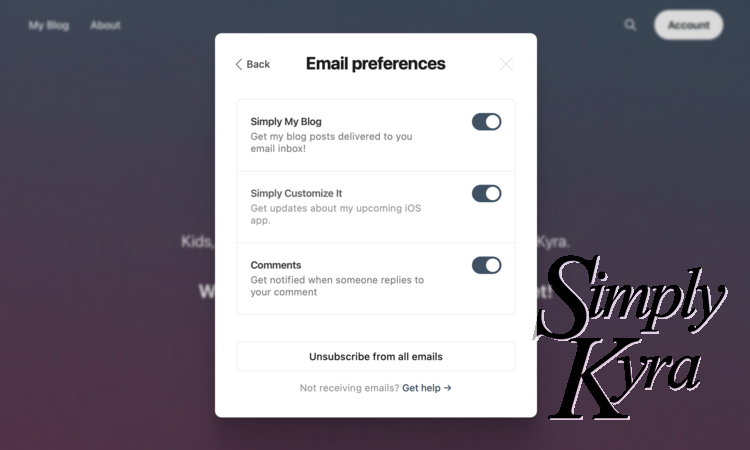
If you sign up for the App Updates newsletter, by creating a free account here, you'll be messaged whenever there's an update pushed to the app store. More information about the newsletters here.
How to get it?
Can I suggest a feature?
Yes, please! I’d love to hear what you want to see next. Drop me a message at mail@simplykyra.com or DM me on social (links in the footer). Popular suggestions help shape future updates.
Want updates?
Join my email list and choose whether you’d like blog posts, app updates, or both. You’ll always stay in the loop (and you can opt out anytime).
If you want to stay connected in another way all my social accounts are listed along the footer of this website although some are updated more frequently than others.
Additional Questions?
If you have a question that isn’t answered here, feel free to reach out at mail@simplykyra.com. I try to keep this page updated with real questions from real users.
Feel free to comment below if you have any additional questions or reach out through mail@simplykyra.com. And if you want feel free to...
Did this save you time?