Simply TBR!
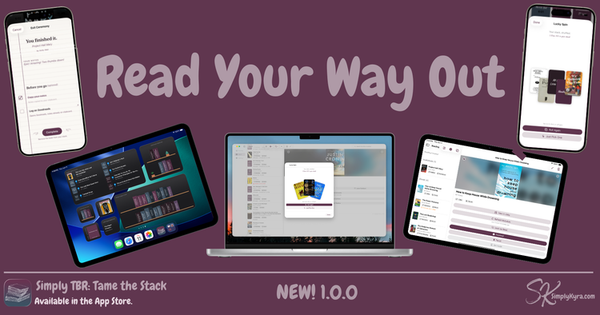
Simply TBR lets you collect all your books all in one calm place so you can stop second-guessing and start reading. Easily surface books in app or through widgets.
Read your way out!
Pick something. Read it. Let it go.
Stop juggling multiple apps to figure out what you own.
One stack. One place. No overwhelm.
Simply TBR is a calm reading backlog manager for people whose TBR (to be read pile) has quietly taken over. Manually import your books or go premium to use buttons and web views to import your NetGalley shelf, Kindle library, Libby loans, Audible library, and more into one place... A way to finally see what you have, pick what to read next, and actually finish it.
Why I Built This
Over the last several years, as I got busier, my NetGalley feedback ratio has dropped from well over 80% to only 56%. My NetGalley shelf has grown larger and I've lost track of what I actually had over that, Amazon First Reads, Prime Reading, and several other sources.
The moment that broke me... I had a Goodreads email about a new book release, realized it was book three in a series and I'd missed book two, and then hopping onto NetGalley realized I already had both book two and three sitting in my Kindle from NetGalley. They'd been there for months and I hadn't started either of them. I had completely forgotten they existed.
I knew then that I needed all of my books in one place, rather than over several apps that had to be pieced together, and I needed that place to become visible...
So I built Simply TBR to answer one question: What do I actually have? And the number of books surprised me.
In its creation I also realized the what should I read next and what am I currently reading are also answered.
— Kyra, indie developer & SimplyKyra LLC 💕
WHAT IT DOES
One calm place for your whole reading pile
Simply TBR isn't a reading tracker, a catalog, or a social app. It's a backlog manager built for the specific, uncomfortable feeling of knowing you have so many books and not being able to see them in one place.
See your whole stack
Import from your reading apps and see every book you have access to in one place... NetGalley ARCs, Amazon, Audible, Libby, and more. Add physical, library, and random other books manually. One simple customizable view. No switching.
Lucky Spin
Can't decide what to read? Tap Lucky Spin! The app displays out a random selection (set to 3, 5, or 7 books) and asks you to pick one. Choose from a smaller subsection of books. Can't decide? Pick one decides for you or roll as many times as you need.
Reading tab
Started books are shown in the reading section. Take notes while you're in it. Pause without guilt. Set aside without shame. Your stack stays tidy and your progress stays visible.
Widgets
From Your Stack surfaces unread books on your home screen. Continue Reading keeps your in-progress books visible. Both available. See what you have, be reminded, and read.
Sort, filter, and group
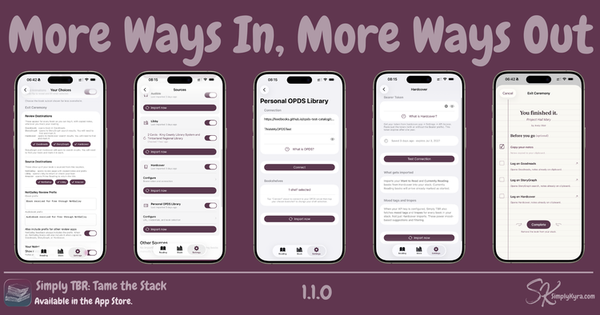
Sort by archive date, added date, author, or page count. Filter by source, format, or cover status. Group by genre or source. Drill into exactly what you feel like reading right now. Know you always want something specific? Go to Your Choice to set what loads automatically.
Exit Ceremony
Finishing deserves a moment. Simply TBR shows links to open your NetGalley review page, return your Prime Reading title, check in your Libby loan, or hand it off to Goodreads... all based on where the book came from. Confetti optional but recommended.
What It Is Not
Not everything belongs in the stack.
Simply TBR is not a reading catalog as there's so many out there already. It's not a wishlist as only books you can actually access belong here. It's not a review platform as it hands your notes off and disappears when completed. It's not a social app and the information is just yours.
There's no ratings, no streaks, and no scores.
No judgment about how long a book has been sitting there.
The emotional job is relief, not record-keeping.
Sources
Where your books come from
Simply TBR imports from the reading apps you already use. Toggle off the ones you don't want to see or use them all!
Import via Button
With "Connected" Subscription
- NetGalleyARCs, archive dates, feedback ratio, and Author Watch
- LibbyCurrent loans and your holds... suspended or otherwise
- KindlePurchased books
- AudibleYour audiobook library
- Amazon SubscriptionsPrime Reading, Kindle Unlimited, comiXology
- Apple Books & OthersImport via library screenshots
Add manually
Always Free
- Physical booksScan the barcode cover
- ISBNQuick entry by ISBN number(s)
- Text FileHave a file of books.. upload to get author, title, and ISBN entered quicker
- OtherOr manually enter books
Plans
Free to start. Connected when you're ready.
Free tier is genuinely useful for building your stack and managing your reading. Connected unlocks importing that makes it effortless.
Free
Free to start, always
- Add books manually, by barcode, or by ISBN
- Filter, sort, and group your books
- See them in a list or with their book covers
- Set a custom cover if wanted
- Take simple notes
- Pick with a Lucky Spin
- Finished? There's an Exit Ceremony
- Surface books on your homescreen with widgets
- Maintain your TBR with duplicate checking
- Keep minimal reading stats
Connected
$1.99/month · $14.99/year
- Everything in free
Connected Unlocks
- Import from NetGalley, Audible, Libby, & Amazon
- Use another app? Import from a library screenshot
- Keep an eye on favorite authors in NetGalley
- Bulk refresh all book metadata
- Bulk fetch the missing covers
3-day free trial (monthly) · 7-day free trial (annual)
Your books stay in your stack even if your subscription lapses.
Pricing shown in the App Store in your local currency
Widgets
Check in without opening the app
Simply TBR has two home screen widgets that keep your reading life visible.
Private By Design
Your reading life is yours
Simply TBR uses your iCloud account to sync across iPhone, iPad, and Mac. No external servers. No analytics. No third-party tracking. Your books, notes, and reading counts stay within Apple's infrastructure and never leave it.
Custom covers you set are stored in CloudKit and synced across your devices. Notes are copied to clipboard when linked to review websites then deleted from the app when you complete a book. Nothing persists anywhere else.
Tame the stack. Read your way out.
See it all. Tame that stack.
Free to download. Calm by design. No judgment about how long that book has been sitting there.
Download on the App StoreSee What’s New with Simply TBR!