
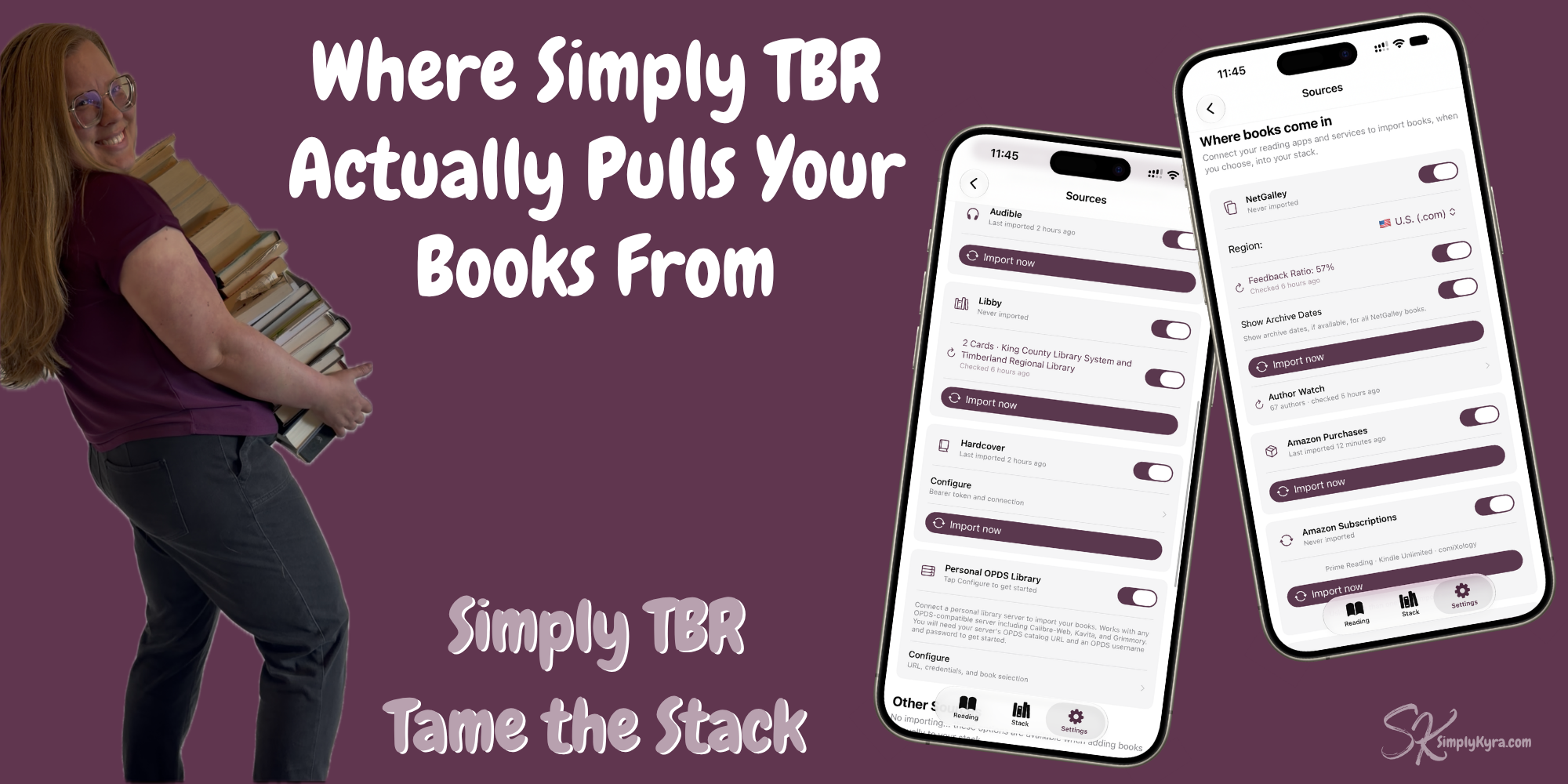
Where Simply TBR Actually Pulls Your Books From

My books were everywhere... NetGalley, Amazon First Reads, Prime Reading, Kindle, library holds, and the actual stacks on my bookshelves. I could never answer one simple question: what do I actually have?
So I built something to pull it all into one place. And then I saw the number... 633.
633! Ughhhhh!
My first reaction was ughhh. Over 600 books I wanted to read and hadn't... many were from NetGalley but the cost of them hurt whether it was in actual money to buy them, the hit to my NetGalley feedback ratio, or even just the time it took thinking about them... and that all led to more guilt over a number. But... knowing that number was the first step. I may not read them all but now I know that they're there. I see what I have, shop from what I see, and choose if I want to add to my pile from a more informed place. This knowledge and visual all in one place is so freeing.
And that's the whole idea behind Simply TBR... instead of guessing, or half-remembering, or opening five different apps to check what you now know. You now see all the books in one stack. You can use filters to choose to show what you want to prioritize or simply browse all the covers in one place.
Here's where that stack actually comes from.
NetGalley
If you review electronic arcs you know the NetGalley shelf problem. Once you're logged in whether it's to review a finished book, check a favorite author, or whatever... you easily get pulled into the pages and pages of amazing stuff and dramatically increase your TBR pile. That, at least for me, was a major way my pile got so big in the first place.
Minimize the NetGalley Rabbit Hole
This started, like the other sources below, by simply importing the books directly so you could see them all in one place either in the app or, with the widgets, right on the home screen. I included archive dates both for display and filtering... or it can be turned off if you don't want to know. When you do finish a book and want to review it on NetGalley you can skip the homepage and instead tap a link to bring you directly to the book's review page with your notes, if you wrote any, and a customizable prefix in your clipboard ready to go. Write the review, return to Simply TBR, and tap complete. So much easier and less enticing... if you prefer.
Author Watch
I used to set a monthly phone reminder for every author I wanted to follow with a link to go check their NetGalley page so I wouldn't miss a release. Then the reminders got overwhelming. I missed some, I put things off, and I hated when the next reminder popped up too soon after I'd finally checked. Eventually, maybe, I'd find out anyway, if I was lucky, from a Goodreads email.
Quick side note... this is a big reason I calculated from when a task was last done and not from when it should be done in Simply Remember It.
I wanted to bring this author reminder system into Simply TBR for me, and if I needed it then, also for you... so I added Author Watch. It's a single spot in the app where you can add any author you follow whenever you think of them. When you're curious tap a button and it checks NetGalley for each of the entered author for you. Want to confirm yourself? Each author page lets you re-check that author and offers a direct link to that particular NetGalley search if you want to be extra sure. Either way this gives you quicker checks and confirmations all in one spot. You don't have to hold it all in your brain anymore... you just need to enter the author at some point.
Feedback Ratio
And then I went further. Despite my feedback ratio being so low (57%... really want to bring it back up) I added a toggle to display it (or hide it) with a button to check and update it within the app.
Website Domains
Then I remembered that there are different NetGalley web domains so you could theoretical switch between .com and use multiple including, at this time, UK, France, Germany, or Japan. Feedback has been tested on all the current NetGalley domains... if you notice any issues please don't hesitate to ask.
Your stack, your choice.
It's still your NetGalley account. This just makes all of it a little more visible.
Amazon
Kindle books, Prime Reading, Kindle Unlimited, ComiXology, and Audible. Five different places to check just to see what you might already own from Amazon.
Simply TBR pulls all of it into your stack: books you bought outright, what's in your subscription, and your audiobook library, with format tags so you always know what's an ebook and what's audio.
Amazon Purchase opens your Digital Orders defaulting to the last 3 months. Amazon Subscriptions auto-opens Prime Reading, with a filter to switch to Kindle Unlimited, Comixology, or elsewhere. Audible works the same way but stays separate, in case you'd rather handle audiobooks on their own.
It's one import per source where you can set or change the filter, page through the content, and hit import when you're ready. You are in control of what it sees. When imported it shows you what it found and you choose what actually goes into your stack.
You already own all of these books. Now you can actually see them.
Libby
A book sounds so amazing so I put it on hold through Libby. Then I remember I don't actually have time right now so I suspend it and it sits there. Or it comes in, I take it out, maybe I start it, maybe I love it, maybe I don't even get a chance to open it. Either way, the loan comes due, the book disappears, and I tell myself I'll remember it later. I usually don't.
I have at least five suspended books waiting for me on Libby right now. So I made that Simply TBR checks both your loans and your holds, because both of them count. You want it, so it belongs on your stack.
When you do start a Libby book mark it as started in the app. If it gets returned before you finish that's okay... simply jot down a quick note so future you remembers why you loved it, what the storyline was, or whatever... then you decide later whether to put it back on hold, buy it, or call it a DNF. The book in the app can sit there, paused, set aside, whatever you need. When you're ready, set it back to reading and, when finished, go through the exit ceremony with a link to return the book early.
I'm juggling two cards and through Libby subreddits and Facebook groups it sounds like plenty of people are juggling more... and I noticed once my imported stack was missing some books. As such I've added an optional section to show and quickly check which cards the app can see. This way you can see which libraries Simply TBR is actually thinking you're a part of and it gives you an area to easily log into more. This way you're not left wondering why some holds aren't showing up when others are.
More... By Request
I absolutely adore books and go through stages where I read a lot and stages where I barely open a book. Lately I've felt behind in reading with life, my apps, and more taking a priority. As such book tracking, beyond NetGalley and Goodreads, hasn't been prioritized. That's why I was overjoyed, not long after Simply TBR launched, to get an email asking about their self-hosted Grimmory where OPDS was used to sync the books. They also wanted StoryGraph and Hardcover added for their reading stat entry.
I added both StoryGraph and Hardcover links to a book's exit ceremony and, beyond that, if you use your Hardcover API access, you can import your books from there along with using it for your entire Simply TBR book stack metadata. Also, if you have a personal OPDS library, you can now use your connection details to connect, choose libraries, and import from there too.
Other Sources
For all other sources like local library and/or physical books you can enter book data manually either one by one or multiple at a time. For me I have several books stored in Apple Books which doesn't have a public API... at least not one I know of and if I'm wrong about that, I'd genuinely love to hear about it. So, as it stands, there's no clean import but I did add in a workaround that works for this and potentially other apps.
You can screenshot your Apple Books shel, and Simply TBR reads it with on-device OCR. It pulls out the titles and authors it sees and shows you what it thinks you have so you can confirm before it's added to your stack. It's not perfect... I'll admit. You may need to edit a book here and there to clean up extra words. But it works, and it means Apple Books, and potentially other apps like it, don't have to be the one place left out of your stack.
Going Deeper
If you want to go deeper I have three older reels that show Simply TBR in action...
or check out the entire playlist here.
Six sources all put into one stack. That's the point of all of it. It's not one more app to manage instead it's simply a place that can finally show everyone in one tame-able stack.
If you want to add books manually either one by one or in batches Simply TBR is free. Try it out, browse your stack... and if you do want to import quicker you can try a free trial of Connected to give you access to all the Sources listed above.
If anything's missing that you wish it pulled from, I'd love to hear from you. I'm always looking to improve Simply TBR.
— Kyra 💕
Did this save you time?