
Simply Remember It! FAQs

Got questions? You’re in the right place.
Simply Remember It helps you stop second-guessing and start logging the things that don’t fit into traditional to-do lists. From tracking chores to one-off events, it gives you peace of mind when your brain just… forgets.
If a question you have isn't here please comment below and/or reach out through mail@simplykyra.com.
App Specific
App Store Page
 SimplyKyra LLC
App Website
 Kyra
Kyra
Email Updates
Supported Apple Devices
Simply Remember It works on iPhone, iPad, Mac, and Apple Vision Pro (through iPad compatibility mode)
The app was primarily developed for iPhone but works beautifully across all Apple platforms with iCloud sync keeping everything in harmony.
If you'd like to see more platform-specific features let me know at mail@simplykyra.com or in the comments below!
Is there an Apple Watch app?
Not at this time. However, you can log tasks using Siri or Shortcuts from your Apple Watch and your widgets will update automatically on your other devices.
Key Features
- Flexible Task Tracking: Log anything you want from household chores to health stats with customizable names, icons, and colors.
- Measurement Support: Track optional measurements (like counts, times, or notes) alongside your task completions.
- Smart Repeat Rules: Set tasks to repeat on your own schedule (days, weeks, months, or years) or keep them open-ended.
- History at a Glance: Quickly see when you last completed a task, with detailed logs for deeper insights.
- Multi-Device Sync: Works seamlessly on iPhone, iPad, and Mac with iCloud, so your data is always with you.
- Free, Unlimited, and Together Tiers: Start free with core features. When that feels too small unlock unlimited tasks, measurements, and charts with a subscription. Want to share tasks upgrade to Together at anytime.
- User-Friendly Interface: Designed to be simple, calm, and intuitive without the clutter of overcomplicated apps.
- Built-In Guidance: Friendly onboarding, in-app tips, and growing FAQs to help you get started quickly.
- Home Screen Widgets: See what's due, track streaks, and view charts at a glance without opening the app.
- Lock Screen Widgets: Quick status check on your iPhone or iPad lock screen.
- Shortcuts & Siri Integration: Log tasks instantly using automation and voice commands.
- Apple Vision Pro Support: Use the app and widgets on Apple Vision Pro through iPad compatibility.
App Versions (Change Log)
The change log was moved to it's own page:
 Kyra
Kyra
Legalities
I've posted both a privacy policy and a terms of use agreement for this app.
Need Help?
If you encounter an error that can't be fixed here feel free to reach out! You can leave a comment here or email me atmail@simplykyra.com, and we’ll troubleshoot it together.
General
What's the difference between Habit, Avoidance, and Monitoring tasks?
Simply Remember It has three task modes because not everything fits the same kind of tracking:
- Habit tracks things you do regularly and want to build awareness around. It includes a streak tracker with a grace window built in, so missing a day doesn't erase your history.
- Avoidance tracks how long it's been since something happened. Useful for behaviors you're working to reduce, without any streak pressure.
- Monitoring logs occurrences over time without any streak logic. Good for symptoms, mood, irregular events, or anything you just want a record of.
How does the repeat schedule work?
When you complete a task, the next due date recalculates from when you actually did it and not from when it was originally scheduled. So if a task is set to repeat every 30 days and you do it 5 days late, your next due date is 30 days from when you actually did it, not 25 days from the original date.
Life isn't perfectly timed, and the app doesn't expect it to be.
Widgets
What widgets are available?
Simply Remember It includes four widget types:
- Tasks Due Widget: See upcoming tasks filtered by category, timeframe, or importance. Available in small, medium, and large sizes for home screen.
- Habit Streak Widget: Track one task's current streak, longest streak, and average spacing. Available in small and medium sizes for home screen.
- Task Charts Widget: View heatmaps and charts without opening the app (Feature with Unlimited). Available in small, medium, and large sizes.
- Next Due Widget: Lock screen widget showing what needs attention next, or a gentle "all caught up" message when you're done. Available in circular, rectangular, and inline styles.
How do I add a widget?
Just update the app. Then:
On iPhone or iPad (Home Screen):
- Long-press your home screen
- Tap the + button in the top corner
- Search for "Simply Remember It"
- Choose your widget and size
- Tap "Add Widget"
On iPhone (Lock Screen):
- Long-press your lock screen
- Tap "Customize"
- Tap the widget area you want to fill (above or below the time)
- Search for "Simply Remember It"
- Choose the "Next Due" widget
- Tap outside to save
On Mac:
- Right-click your desktop
- Choose "Edit Widgets"
- Search for "Simply Remember It"
- Drag the widget to your desktop
Do widgets update automatically?
Yes! Widgets refresh throughout the day to show current task status. When you log a task through Siri or Shortcuts, widgets update immediately. That said there's also a button on the top of Settings if you prefer to check.
Can I log tasks from widgets?
Widgets don't have buttons to log tasks directly, but you can use Siri or Shortcuts to log any task with default measurement values:
"Hey Siri, log Creatine in Simply Remember It"
This works from anywhere, your phone, widgets, or even Apple Watch, and updates all your widgets instantly.
Do widgets work on Apple Vision Pro?
Yes! Home screen widgets work on Vision Pro through iPad compatibility mode. You can pin widgets to surfaces in your spatial environment.
Lock screen widgets are iOS only and aren't available on Vision Pro.
Will my data sync to widgets on Vision Pro?
Yes! iCloud sync works across all platforms. Add a widget on Vision Pro and it'll show the same tasks you see on your iPhone, iPad, and Mac.
Do I need Unlimited for widgets?
No! The Tasks Due, Habit Streak, and lock screen widgets work for everyone. Only the Task Charts widget requires Unlimited.
Shortcuts
How do I use Shortcuts to log tasks?
You can create custom Siri shortcuts to log tasks instantly with voice commands or automation:
Setting up a Shortcut:
- Open Apple's Shortcuts app
- Tap + to create a new shortcut
- Search for and add "Simply Remember It" actions
- Choose Log Task and select which task to log
- If your task has measurements, the shortcut will use your default values
- Name your shortcut something simple like "Log Creatine" or "Water the plants"
- Tap Done
Using your Shortcut:
- With Siri: "Hey Siri, log Creatine"
- From widgets: Add the Shortcuts widget to your home screen
- From Apple Watch: Use Siri on your watch to trigger any shortcut
- With automation: Set shortcuts to run automatically based on time, location, or other triggers
Note
You can always edit the logged entry later if you need to adjust the time or add notes.
Subscription Plans
Choose the plan that best fits your needs. I use an Apple subscription group with Family Sharing enabled, so you can upgrade, downgrade, or switch plans anytime under Profile > Subscriptions or, if active, check out your subscriptions through Apple.
🎁 Trial Periods
- Yearly plans include a 1-month free trial
- Monthly plans include a 1-week free trial
🆓 Free Tier
Get started at no cost with:
- Up to 8 active tasks
- Up to 5 measurements per task
- Up to 80 overall history events
- iCloud sync across iPhone, iPad, and Mac
- Read-only access to categories and measurement units
💎 Unlimited (Monthly/Yearly)
Unlock the full Simply Remember It experience:
- Unlimited tasks, categories, and measurements
- Access to all charting and insights features
- Create, edit, and track without free-tier limits
💎 Together (Monthly/Yearly)
Combine Unlimited with Shared tasks.
Multiple Devices
Your subscription works across iPhone, iPad, and Mac as long as you’re signed into the same Apple ID. Your library syncs through iCloud.
Together & Sharing
What is the Together tier?
Together adds shared task logging — you can share a task with someone else so both of you can log completions and see the full history. It's designed for households, co-parents, or anyone tracking something that more than one person does. Think: who last gave the dog her medication, or who changed the air filter.
Do the people I share with need a Together subscription?
No. Only the person creating and sharing the task needs Together. Anyone you invite can log completions without it counting against their free limits.
What gets shared when I share a task?
The task itself, all log entries, and any measurements. Each log entry shows who logged it. Your personal display preferences (colors, layout, how you view the data) are shared but people can alter it and you can change it after keeping it yours.
Can I customize how a shared task looks on my end?
Yes. Colors, the metrics toggle, and your summary view are all personal preferences. The task is shared; the way you see it isn't.
Who can edit or delete log entries on a shared task?
The task owner can edit or delete any entry. Other people in the group can only edit or delete their own entries.
How do I stop sharing a task or leave a shared task?
The task owner can stop sharing at any time. If you've been invited to someone else's task, you can leave it. If you leave and change your mind, you'd need to be re-invited.
Does Together work across iPhone, iPad, and Mac?
Yes. Together is build on Unlimited and syncs Apple's CloudKit infrastructure so it works across all Apple devices. Android sharing isn't available yet but is planned for a future update.
Privacy & Data
How is my data stored? Is it private?
Your data stays within Apple’s ecosystem and syncs through your iCloud account. Simply Remember It does not use external servers, trackers, or third-party analytics. Your data stays private and under your control.
Can I export my data?
Your data is stored in iCloud, so it's backed up automatically with your Apple ID.
Data export isn’t available yet, but it’s something I’m considering for future updates. If this is important to you, feel free to reach out and let me know. Feedback helps shape what comes next.
Offline & Sync
Does Simply Remember It work offline?
Yes. You can log tasks and view your history even without an internet connection. Any changes you make will sync automatically through iCloud once you’re back online.
What happens if I delete the app or get a new device?
As long as iCloud sync is enabled, your data will restore automatically when you reinstall the app or sign in on a new device with the same Apple ID.
Accessibility
Is Simply Remember It accessible?
Simply Remember It is designed with accessibility in mind and supports Dynamic Type and system accessibility settings. If you encounter any barriers or have suggestions for improvement, please reach out at mail@simplykyra.com.
Localization
Does the app support multiple languages?
Simply Remember It is currently available in English. Additional language support may be added in the future based on interest and feedback. That said, it is available in all countries offered in the App Store.
Future Updates
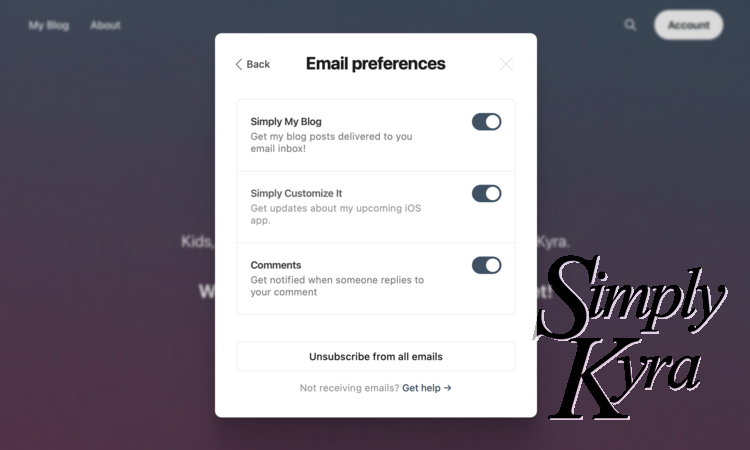
If you sign up for the App Updates newsletter, by creating a free account here, you'll be messaged whenever there's an update pushed to the app store. More information about the newsletters here.
General
What is Simply Remember It for?
Simply Remember It helps you track when things last happened without relying on memory, sticky notes, or mental math.
From Did I give the dog her meds? to When did I last clean the shower?, it’s your brain’s external backup for life’s forgettable tasks.
Can I use this to track habits?
Absolutely. While it’s not a traditional streak-based habit tracker, you can still log any routine and track your progress over time with full control over how often and what data you log.
Does the app send reminders?
Not yet... but that's by design. For now, widgets give you gentle, glanceable reminders without notifications or alarms. You can check your home screen or lock screen to see what needs attention.
We're exploring smarter, calmer notification options for the future. Until then, widgets and your repeat intervals help you stay on track without the noise.
Can I track more than just dates?
Yes! Add optional notes or measurements to each completion whether you want to record bug sightings, temperature, mood, or other details. Measurement types are totally customizable.
What if I forget to log something on the right day?
That’s okay. You can edit past entries at any time and adjust the date or time. Life isn’t perfect, and the app is designed to be flexible when things don’t happen exactly on schedule.
Can I use Siri to log tasks?
Yes! You can go into Apple's Shortcuts app to add quick logging and give it a simple name like "Log Creatine." Then you can use Siri and say:
"Hey Siri, log Creatine"
And it will be marked as done. If it has any measurements set, it will use the default value you set for it. Plus you can always go in to edit it later.
Is this app good for families?
Definitely. It was inspired by parenting chaos! Whether you’re tracking dry nights, toddler milestones, or household maintenance, the app is flexible enough to fit your season of life.
Can multiple people share the same tasks?
Yes! The person that shares the task needs to have Together unlocked to share a task but you can share a task between multiple Apple accounts. The people shared with do not need a subscription and the task and any logs won't count towards their free limits.
Can I edit timestamps or fix streaks?
Yes! You can manually edit past entries and correct the time if needed. The app doesn’t lock you in. Life isn’t perfect and your app shouldn’t expect you to be either.
What makes this different from Reminders or Notes?
Those apps are great but they’re not built for remembering when something last happened. Simply Remember It is designed to track and reflect not just plan.
Is there a free version?
Yes! You can try it for free with limited tasks and measurements. Unlimited unlocks charts, more customization, and unlimited flexibility. Together includes Unlimited and allows sharing between Apple accounts.
Is there an Android version?
Android is in active development! The Apple version is live now. Android is coming. If you want to be notified when it's available subscribe, for free, at the top of the page.
Timezones
How does the app handle time zones?
All entries are saved in UTC so your data stays accurate across devices and travel. On your screen, everything adjusts to your current timezone so today always feels like today.
Connect With Me
How to get it?
Can I suggest a feature?
Yes, please! I’d love to hear what you want to see next. Drop me a message at mail@simplykyra.com or DM me on social (links in the footer). Popular suggestions help shape future updates.
Want updates?
Join my email list and choose whether you’d like blog posts, app updates, or both. You’ll always stay in the loop (and you can opt out anytime).
If you want to stay connected in another way all my social accounts are listed along the footer of this website although some are updated more frequently than others.
Additional Questions?
If you have a question that isn’t answered here, feel free to reach out at mail@simplykyra.com. I try to keep this page updated with real questions from real users.
Feel free to comment below if you have any additional questions or reach out through mail@simplykyra.com. And if you want feel free to...
Did this save you time?