Simply Remember It 2.0: Quicker Access, Gentler Check-Ins

This update has been quietly in the works for a while... and today it’s ready.
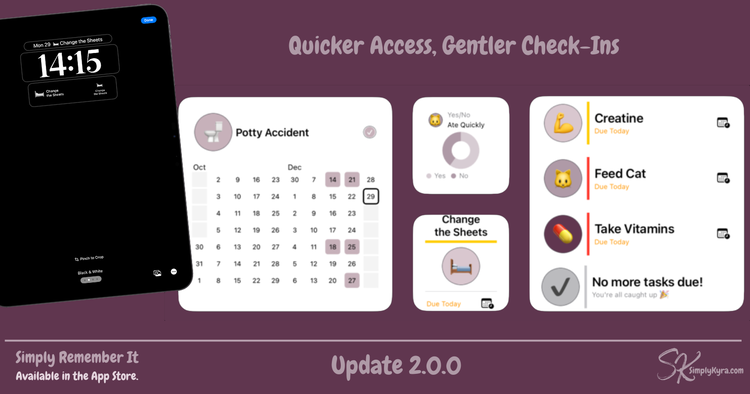
Version 2.0.0 introduces widgets to Simply Remember It, letting you check what’s due, see patterns, and keep streaks going without needing to open the app. It also includes a handful of behind-the-scenes changes that make the app feel faster, more natural, and better integrated across your devices.
This is the first time I’ve bumped the major version number and not because everything changed, but because how the app fits into your day has.
Home Screen Widgets
Right Where You Need Them
Widgets are the heart of this update.
They’re designed to offer quiet awareness, not interruptions. Giving you a way to check in without being pulled into an app or a list.
Tasks Due Widget
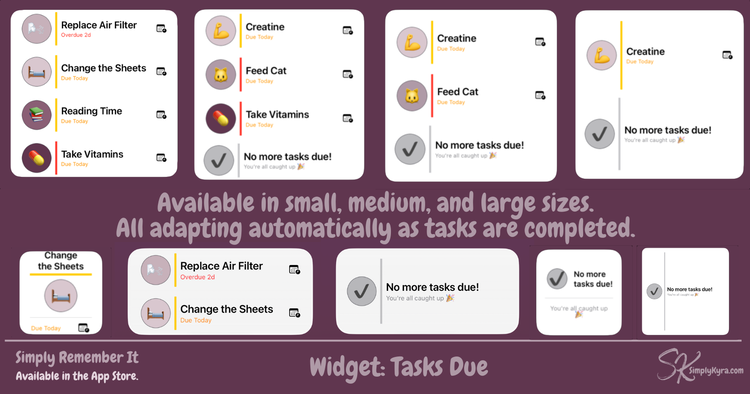
This widget shows what needs attention by displaying up to one, two, or four tasks at a time depending on its size. As you complete tasks, the widget quietly updates to show what still needs attention or lets you know when you’re caught up.
It’s not a to-do list. It simply surfaces what’s overdue or coming up soon. Once you’re fully caught up it shows a calm reassurance instead.
You can customize:
- how far ahead it looks (today, a few days, or further)
- whether habits appear (so completed daily habits don’t reappear immediately for tomorrow)
- whether it shows all tasks or only tasks from one category
Available in small, medium, and large sizes on iPhone, iPad, Mac, and Apple Vision Pro.
Task Streak Widget
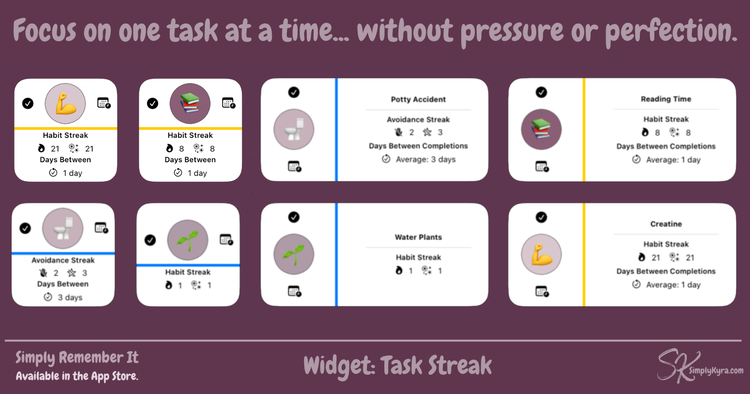
This widget focuses on one task at a time, showing your current streak and giving you quick actions right from your home screen. Mark it done or reschedule it, and you'll jump straight to the right spot in the app. No distractions on the way.
It isn’t about perfection. It’s a small nudge to keep going, when you want it.
Available in small and medium sizes.
Task Chart Widget
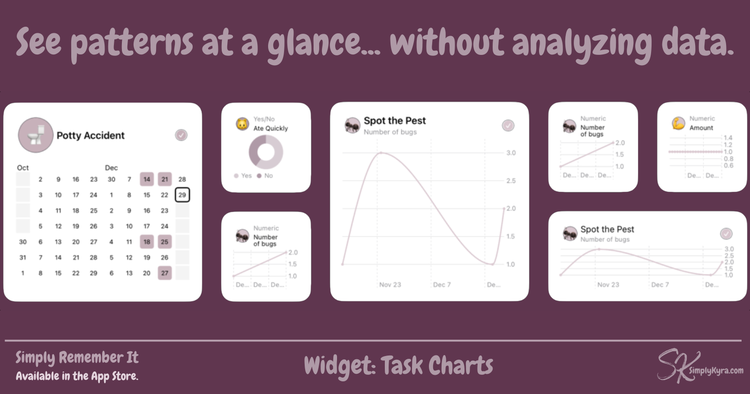
This widget brings charting to your home screen, so you can see patterns at a glance.
It can display:
- heatmaps for frequent tasks
- numeric trends
- yes/no summaries
- or automatically choose what’s most useful for that task
Tap the chart to see the full view inside the app.
This widget is designed to feel informative, not demanding.
Available in small, medium, and large sizes.
Beyond the Home Screen
Lock Screen: What's Next
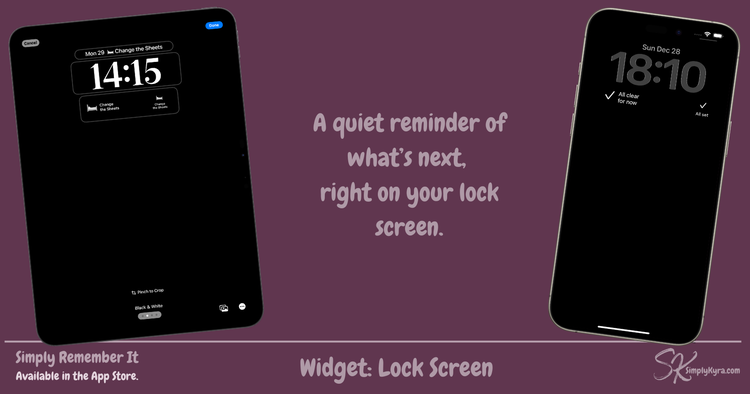
A new lock screen widget keeps things especially simple.
It shows the single next task that’s overdue or due today. When nothing is due, it displays a gentle reassurance instead.
No configuration. No buttons. Just a quiet answer to “What needs attention next?”
Faster Logging with Shortcuts & Siri
Simply Remember It now supports App Intents which means faster logging through Shortcuts and, once set up, easy access through Siri.
You can now set default measurement values for a task inside the app. When you log that task through a shortcut, it’s completed instantly and any attached measurements are filled in automatically. No need to open the app or step through extra screens.
You can always go back later to adjust or add details when you have the time.
This makes it easier to:
- log something before you forget
- avoid being slowed down by extra steps
- fill in details when it works for you
Because this runs through Shortcuts you can also include it in your own automation flows if you want Simply Remember It to fit even more seamlessly into your day.
Navigation & Architecture
Quiet but Important
To support widgets and deep linking, some navigation behavior has been simplified.
- macOS continues to use a sidebar
- iPad lets you choose between sidebar and tabs
- iPhone now uses tabs only
Most people won’t notice much difference, but these changes made widgets simpler to support while making the app more reliable and easier to extend going forward.
Vision Support
Small, but Supported
Simply Remember It now runs as an iPad app on Vision with widgets fully supported.
While I don’t currently have a Vision device to test extensively I wanted you to be able to switch between devices and keep your tasks up to date with minimal fuss. I can’t promise a fully polished spatial experience yet, but the core app and widgets should work as expected. If you try it, I’d love to hear how it feels!
Polishing & Fixes
This update also includes:
- fixed cut-off text
- corrected button actions
- layout and interaction refinements
- general stability improvements
Nothing flashy... simply smoothed some edges.
Why 2.0?
This update doesn’t change what Simply Remember It is.
It changes how easily it fits into real life.
With widgets and faster access, the app becomes something you don’t have to remember to open. It’s simply there when you need it and invisible when you don’t.
That felt meaningful enough to mark with a major version bump.
A Quick Thank You
Thank you for your patience while this foundation came together, and for trusting Simply Remember It with the small details of your life.
As always, if something feels off or you have questions, you can comment or email me anytime.
Here’s to remembering more and stressing less.
— Kyra
Did this save you time?