
Simply Customize It 1.0.20: Turn Off The Rotating Sleep Screen Overlay

What’s New
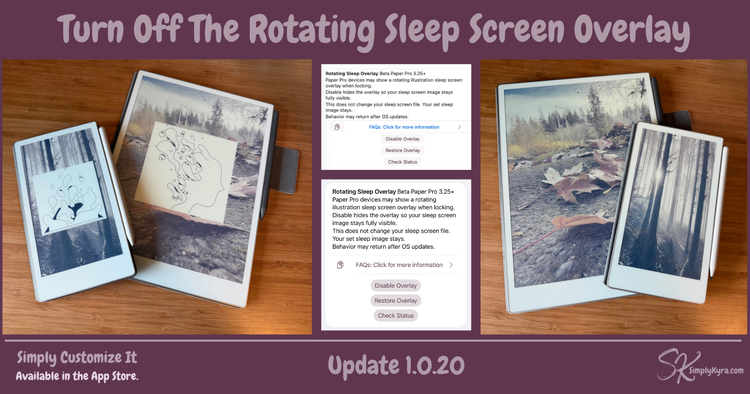
Recently, I noticed that my reMarkable Paper Pro and Paper Pro Move (running the 3.25 beta) were showing rotating system illustrations overlaid on top of my sleep screen image when locking the device.
This didn’t appear to affect my reMarkable 2.
 Kyra
Kyra
I shared a quick heads up and my initial reaction here in case you missed it.
The Fix
After some testing, I found a way to turn off the rotating overlay behavior on devices that support it without changing or resetting your actual sleep screen image.
I’ve added this directly into Simply Customize It so you don’t need to run any commands yourself.
New Tools
You’ll find a new section in Screens, just below My Groups, with three buttons:
- Disable Overlay – Turns off the rotating system illustrations so your sleep screen remains fully visible.
- Restore Overlay – Restores the default behavior by undoing the change made when disabling the overlay.
- This won’t force the feature on devices like the reMarkable 2. It simply restores the original state.
- Check Status – Runs a quick check (without changing anything) to see whether the overlay behavior is currently enabled.
Good to Know
- This only affects the overlay behavior. It does not replace or reset your chosen sleep screen image.
- If you’re using the default sleep screen, it will remain set. If you’re using a custom image, it won’t revert back.
- If your device doesn’t support this feature, these tools won’t visibly change anything. That said, they’re safe to run.
- I’ve noticed that after restoring the overlay and restarting the reMarkable, it may not appear until you unlock the device once.
A Quick Note on Pricing
As Simply Customize It continues to grow and adapt quickly to reMarkable updates and new devices pricing for new subscribers will be increasing. If you’re already subscribed your current pricing is not changing at this time.
This update helps support ongoing development, device testing, and timely updates when reMarkable makes system-level changes. Thank you for being here. Your support truly makes this work possible.
Did this save you time?