
reMarkable OS 3.25 Beta: A Quick Heads Up About Sleep Screen Behavior

Today I updated all of my reMarkable devices to the OS 3.25 beta, including:
- reMarkable 2
- reMarkable Paper Pro
- reMarkable Paper Pro Move
Overall, the update itself went smoothly. Notes, syncing, and general usage all behaved as expected. However, I did notice a change in sleep screen behavior on the Paper Pro models that I wanted to share early, just as a heads up for anyone considering the beta.
This post is informational only (no panic needed) but if you care deeply about your custom sleep screen, it’s something worth being aware of.
If you prefer a visual walkthrough, here’s a short video showing what I observed shortly after updating.
This video was recorded quickly to share early observations. Additional details and context are included below.
Update: December 18th 2025
Just released an update with Simply Customize It that, at this time, lets you turn off the rotating sleep screen overlay. This was tested on both my reMarkable Paper Pro and Paper Pro Move. At this time the overlay doesn't appear on my reMarkable 2 but in case it does in the future the fix isn't locked to the Paper Pro.
 Kyra
Kyra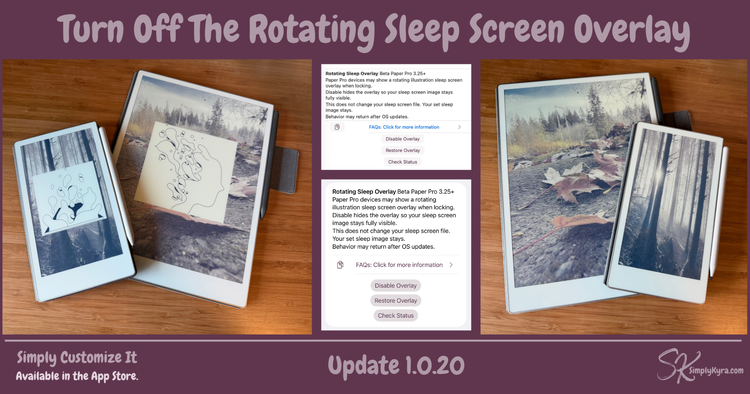
Update: December 20th, 2025
I went down a bit of a rabbit hole after this and have now shared what I found, how the overlay works, and a couple of ways to handle it whether you have my app or not.
 Kyra
Kyra
What I Observed
reMarkable 2
On reMarkable 2, everything works as expected.
- Custom sleep screens remain in place
- No visible changes from previous behavior
- Simply Customize It works normally for sleep screen images
No issues to report here.
reMarkable Paper Pro & Paper Pro Move
On both the Paper Pro and the Move, the behavior is slightly different.
- You can still replace the sleep screen with a custom image
- However, there appears to be a new system-level sleep screen behavior layered on top
- The device looks like it may be cycling or rotating through multiple sleep screens
After updating to OS 3.25 beta on the Paper Pro devices I originally imported the default sleep screen and it was simply a white image with text only at the very top.
After uploading my custom sleep screen image I noticed what appears to be a system overlay layered on top of the custom image. This suggests that if I had not changed the sleep screen, the behavior would likely have appeared as the default sleep screen updating or changing in the background, rather than as a visible overlay on a custom image.
What This Is (and What It Isn’t)
At this point, I cannot confirm whether this behavior is:
- a beta-only bug
- a new default behavior for Paper Pro devices (assuming)
- or a feature that will eventually be optional or configurable (hoping)
What I can confirm:
- This shows above your custom sleep screen images
- This is limited to sleep screen presentation
- This behavior was observed on beta software, which is unfinished by design
Others Are Seeing This Too
I’m not the only one noticing this behavior. A Reddit thread discussing the OS 3.25 beta was posted earlier today, and other users are reporting similar sleep screen updates:
3.25 Beta is out
by u/elmwn in RemarkableTablet
What This Means for Simply Customize It Users
If you use Simply Customize It primarily to set a custom sleep screen image:
- Your images are still safe
- Uploading and replacing sleep screens still works
- You may see additional system behavior layered on top on Paper Pro devices while on the beta
If you prefer a completely static sleep screen, you may want to:
- wait for the stable release
- or keep an eye on how this behavior evolves during the beta period
As always, beta software can change before release.
Final Thoughts
This post is simply meant as an early heads up, not a warning or alarm.
The update otherwise appears stable, and it’s very possible this behavior will be refined or clarified before the stable release.
I’ll continue testing and will share updates if anything changes or becomes clearer.
If you’ve noticed this behavior as well or if your experience differs feel free to reach out or comment. Shared observations help everyone navigate beta updates more confidently.
And like always I hope you’re having a great day.
If you’re interested in getting any of my future blog updates I normally share them to my Facebook page and Instagram account. You’re also more than welcome to join my email list located right under the search bar or underneath this post.
Did this save you time?