
How I'm Actually Using AI as a Solo Developer (Still Figuring It Out)

I want to be upfront here... this isn't a hot take.
I'm not here to tell you whether or not AI is going to save indie development... or destroy it. Whether it's something you should be excited about or worried... and I'm definitely not here to tell you that I've solved it all and figured out the right way to use it. I haven't. I'm writing this because the conversation out there feels very loud in both directions, and my actual experience has been... quieter than that. And I wondered if I should share...
So here's what it's actually looked like for me.
The Beginning Was... Kind of Casual
When ChatGPT first came out I used it the way a lot of people probably did. Day to day stuff that used to be a Google away became a ChatGPT question.
For one... cooking stuff. Taking a photo of the bag of froze dumplings with directions on boiling and frying... and asking how long to steam it. Sharing my leftovers and produce in the fridge and asking if they'd work together... and wait you're offering a recipe? Sure let's do it and use it as a guideline. In these cases I used to Google that and if there was at least one recipe that existed online that confirmed my combination would be decent I'd charge ahead... and if there were a bunch of recipes meander through several and combine tow or three of them together into... again... my concoction. You liked it? Great... not sure how I'd create it again. So this felt like the same thing but faster. And maybe even easier to duplicate... if requested.
I started on the lowest plan... and discovered research mode. Research mode was cool once I realized if I kept seeing an ad for a particular product... whether a Panadrum, skip.dev, exercise class on a Trybe.fit platform, Foton candles, or whatever... I could ask it to research it, find third party reviews, similar products, and maybe apply it to my use case. Quick first round vetting felt attainable.
I also dabbled with projects using one for each of my apps so if I had an idea about an app I could go to that particular project and drop it in. It was partially organizational and partially just working through ideas. Back in December when the reMarkable 3.25 beta dropped I shared the overlay with you all, opened a new chat thread, and started exploring while typing up what I saw while connected to the reMarkable. Some ChatGPT replies where maybe helpful while others weren't... but I solved the problem, added an update to Simply Customize It, and then went back to the thread to play a what if game pushing the envelope further, sharing what I saw on the reMarkable, and then getting a vague draft for an exploration post that I re-wrote sharing what I found with all of you. Did I use it as a draft and change it up... yes... but it's easier to critique, judge, and change sometimes than staring at a blank page.
 Kyra
Kyra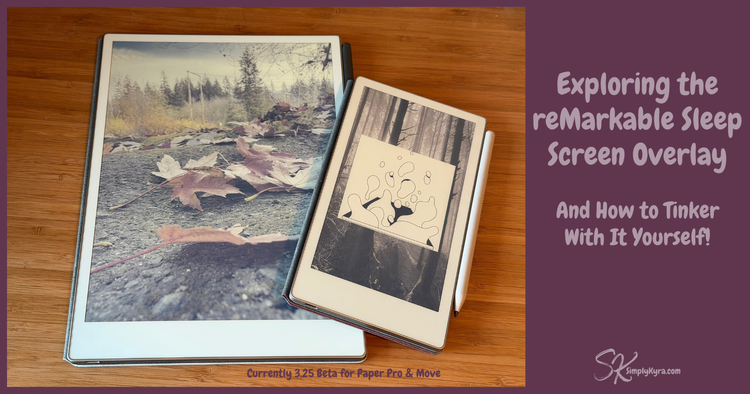
Since I had a ChatGPT membership anyway I dipped into it for code help occasionally when I was stuck... but it was sometimes more frustrating than helpful. That said, overall, it was useful, low stakes, became an idea graveyard, and was not very transformative.
Learned About an Apple Doc MCP
Over the last year I started attending iOS Dev Happy hours and back In November Mihaela shared her Cupertino MCP project. If you're not familiar with MCPs, they're essentially a way to give AI tools access to things like documentation, frameworks, and context beyond just a simple chat window. At the time I'd been fighting with a coding issue for the last couple weeks and it sounded genuinely useful... which led me to Claude.
Around this same time, Matt and I had one of those rare mornings where the kids were at school and we both happened to have time. We'd gotten our own offices about a year ago and when I shared that I was debating Claude he decided we needed to both try it.... and we had a FaceTime date morning with both of us setting up and trying Claude in our own way while sharing as we went.
It sounds small but it was genuinely fun. One we hadn't experienced since we moved but missed from sharing an office. It was one of those "let's figure something out together" mornings.
At the time we both paid for Claude. Him for one month as he's more terminal and keyboard guy and wanted Claude Code... and me for one year because Cupertino sounded that good. I stuck with the app, immediately added the filesystem so Claude could see where my code was, and got down to getting the Cupertino MCP hooked up properly. With all that done I got to work.
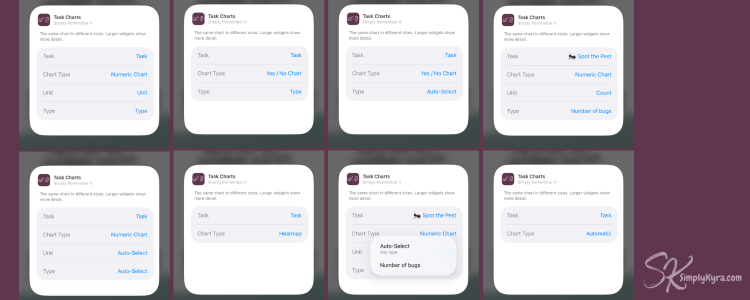
My problem was a widget issue in Simply Remember It. I had gotten the first two widgets to work but had grand visions for the charting widget so you could essentially duplicate the charting tab with heatmaps, pie charts, and numerical charting. This meant I needed to be able to show and filter drop-down menus, when editing the widget, with dynamic information and filter by previous choices. Getting all those conditional parameters to behave correctly, passing the right data, filtering based on other selections... was tough and I had been fighting it for a week or so. Within an hour of working through it with Claude I had the minimal version working.
Although I had bought the lowest annual plan I chose not to upgrade and see if it continued to be helpful. As such the token limit was repeatedly hit over the next couple months as I experimented over Christmas break with the odd idea (they got paused indefinitely) and finally shifted all my coding over to Claude Code in the terminal.
What My Setup Looks Like Now
I recently canceled my ChatGPT account... and I still haven't intentionally upgraded my Claude plan. I've started using the token limit as a kind of natural boundary. It makes me think about what I actually want to work on before I start. How do I want to use this session? What's the most useful thing I could do right now? It's a small thing, but I feel it helps to keep me from just throwing everything at a problem and hoping.
I hear people talking about maximizing agents, automating content, letting multiple AI systems run in parallel. That might be right for some people. For me, I want to build mindfully and learn as I go. I'm a solo developer with SimplyKyra being small by design. Although I want to accomplish so many things automating myself out of the loop isn't the goal.
What Claude Has Helped
Beyond the widget fix, a few things stand out from over the last month.
I recently used Paul Hudson's SwiftUI-Pro skill in Claude Code to audit my code. If you're an Apple developer and curious about AI tools, his free AI-centered livestream on the topic is worth your time. I'm a member of his membership and his monthly livestreams have been one of my favorite ways to see new ideas as I focus on my apps.
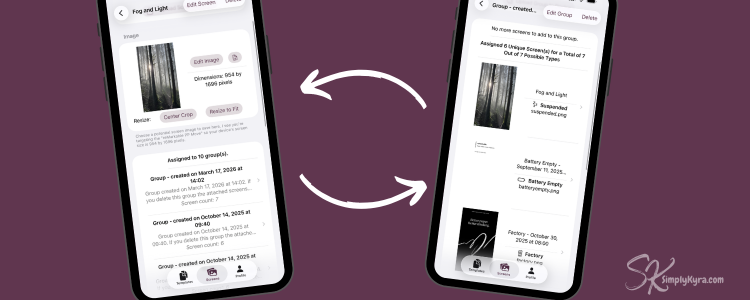
The audit surfaced things I might not have gone looking for on my own. While going over recommendations and code changes I found a separate navigation issue in Simply Customize It. On the Screens tab you can look at the Screens or the Groups and both link to each other letting you go in circles if you want. I realized that if you went deep enough through that navigation path on macOS (and sidebar view on the iPad) the app crashed. I hadn't noticed because I've been defaulting to using my phone to navigate and it's setup different. Some back and forth managed to fix it though I couldn't keep that deep path, there's a two-level limit now, it doesn't crash. Being stable and not broken is definitely progress there.
Over the last month or two I grappled with getting task sharing working between different Apple device and in doing so I needed to learn a bit more about CloudKit and deploy schema changes from development to production. Being able to take screenshots of what I was looking at and getting walked through it, step by step was amazing. I loved the support, not just because it was faster, but because I could ask questions and dig into the why without feeling like I was bugging someone.
Still Figuring Out
Right now Claude fits the way I work. It's a way to hold quick ideas throughout the day, organize my thinking, move through planned work faster, and get a second opinion on my code. I'm not using it to write my blog posts or draft my social captions or replace the parts of this work that feel like me.
There's a lot of noise about AI right now. People are strongly in favor, strongly against, or somewhere in the middle... and all sides have points worth hearing.
My honest take is that I'm somewhere in the middle, still watching, still adjusting. I don't try to learn it all, pay for the lowest plan, and use my limits thoughtfully. I'm learning more than I expected to. Yet also attempting to stay in the loop on everything it touches.
Right now that feels good for where SimplyKyra is. Small, intentional, and mine.
If you're curious about any of it, I'm happy to talk through it. You can always reply to this post or find me on Instagram.
Did this save you time?